


How to Choose a Cinema POS System: An Operator’s Checklist
A cinema POS is not a retail till with a movie schedule bolted on. The right system has to sell reserved seats in real time, handle tickets and concessions in one basket, keep online and counter inventory in sync, and give you clean cash-up and distributor reporting at the end of the day. This checklist is for independent owners, venue managers and small-circuit operators who need to evaluate cinema POS software before a demo or a switch, without getting sold a generic retail package.
Who this guide is for
If you run a single screen or a small circuit, you are usually weighing three things at once: will staff learn it quickly, will it talk to your online booking without double-selling seats, and will month-end reporting still make sense after cutover? Finance managers will care more about fees, reconciliation and data export. Circuit operators will care about permissions, multi-site consistency and whether head office can see the same numbers as the venue.
The questions below are the ones that separate a workable cinema POS from an expensive mismatch.
What separates cinema POS from retail POS?
Retail POS is built around products, stock and a simple basket. Cinema POS has to manage time, seats and channels as well as products and stock:
- Inventory is seats by showtime, not only SKUs. A sold seat must lock across box office, kiosk, web and app instantly.
- Tickets and concessions often share one transaction, with different tax rules, refunds and reporting lines.
- Advance bookings, gift cards, memberships and refunds sit inside day-to-day till work; not as bolt-ons you hope integrate later.
- Distributor and box-office reporting needs film-level and performance-level detail retail systems rarely provide cleanly.
- Entry (scanning / Gatekeeper-style validation) has to match what was sold, including paperless tickets.
If a supplier’s demo looks like a shop till with a film list, ask how reserved seating, channel sync and refunds actually work under load.
How should seats, concessions, refunds and reporting work together?
Use this as your “must work in one system” test.
Seats and ticketing
- Can staff sell, reserve, block and swap seats without leaving the POS?
- Do online holds and counter sales update the same seat map in real time?
- What happens when payment fails after a seat hold; does the seat release cleanly?
- Can you handle wheelchair spaces, seat groups and different price tiers on one plan?
Concessions
- Can tickets and food/drink land in the same basket with correct tax and pricing?
- Is stock deducted when the item sells (and reversible on refund/void)?
- Can you run combos, upgrades and staff prompts without custom workarounds?
Refunds and exceptions
- Are refunds, exchanges, credit notes and partial gift-card redemptions first-class flows?
- Does a refund reverse seat availability, stock and the right report lines?
- Can you see who authorised the refund and when?
Reporting and cash-up
- Can you reconcile cash, cards, online sales, gift cards and refunds in one daily process?
- Are box office and concession revenue separated cleanly for ops and for distributors?
- Can you filter by sales channel (POS, kiosk, web, app) without exporting five spreadsheets?
Advice changes with venue size: a single-screen indie may prioritise speed at the counter and simple cash-up; a three-screen or small circuit needs stronger permissions, multi-screen scheduling and head-office reporting consistency.
Cinema POS features checklist (what to see in a demo)
Ask the supplier to run live examples, not slides:
- How to add a movie and how easy is the scheduling.
- How to change prices of showtimes or concessions.
- How to manage stock.
- Sell two tickets + concessions in one basket, mixed payment (card + gift card).
- Process a refund that frees the seat and corrects stock.
- Run a partial day cash-up with an unexplained variance and show how you’d investigate.
- Change a price or promotion and show where it appears (POS, kiosk, online).
- Export or display a distributor-relevant bookings/performance view.
Weighted evaluation scorecard
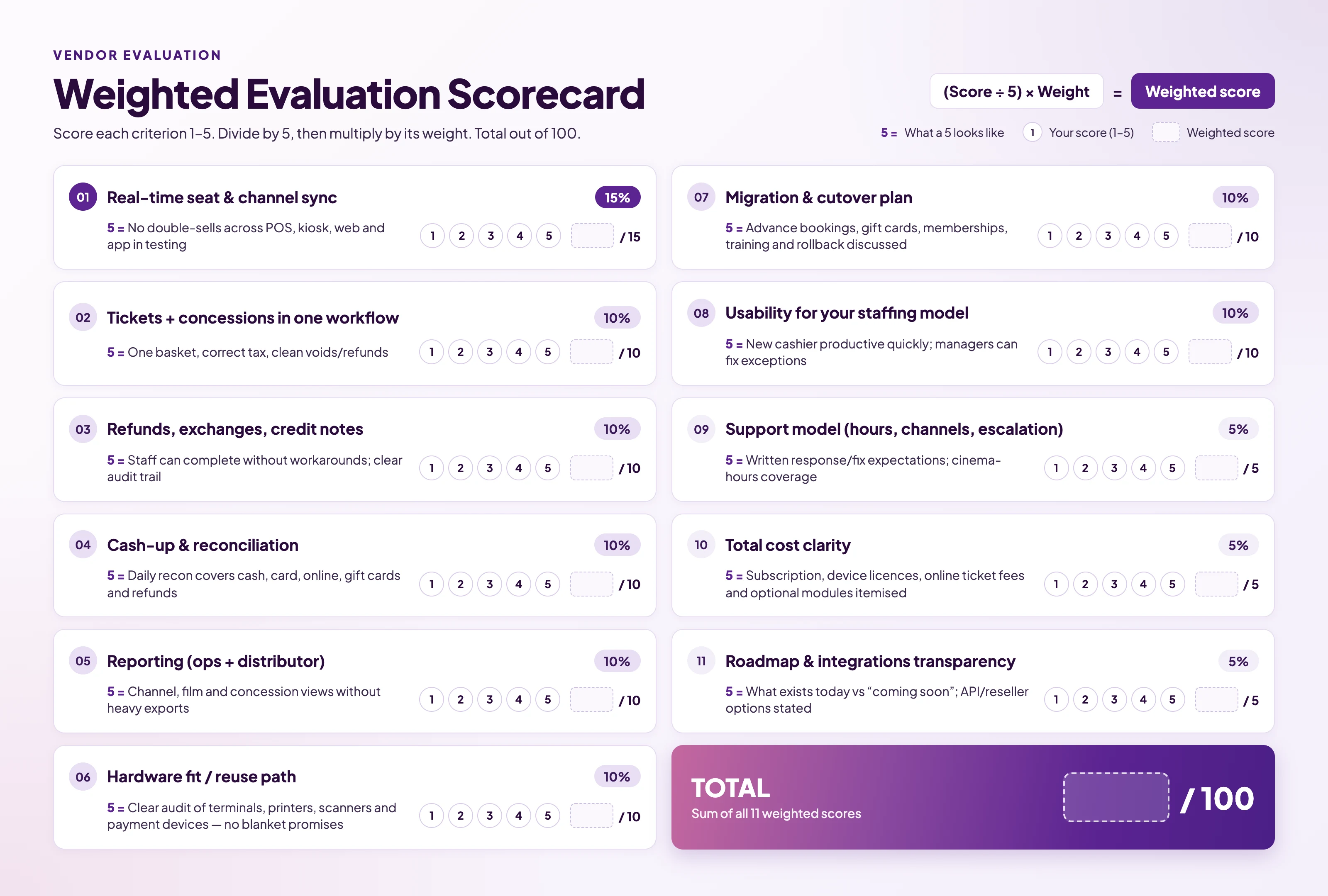
How to use it: run the same scorecard with two or three suppliers. Anything under 70 with a low score on sync, refunds or cash-up is a risk.
What must a supplier demonstrate before you sign?
Beyond features, insist on proof of operating reality:
- Test transactions: In a sandbox that mirrors your screen count and channels.
- Fee structure in writing: Subscription, per-device licences, online ticket fees, payment costs, optional modules
- Migration ownership: Who moves seat maps, customers, gift-card balances, memberships; what happens to advance sales at cutover; rollback plan.
- Continuity: What happens if connectivity drops; what is verified for this product, not industry folklore.
- Data: Can you export your data; who owns it; how long backups are retained.
- Support: Cinema trading hours, escalation path, whether changes are tested before going live.
For independents, a supplier that can localise tax/language and keep implementation light often matters more than a mega-feature list. For circuits, multi-location permissions, central price cards and consolidated reporting usually outweigh a prettier till screen.
How this maps to CINEsync
CINEsync is built as cloud cinema software with on-premise tools (box office POS, concession POS, kiosk, Gatekeeper entry, kitchen display) tied to one back office, plus white-label web and mobile sales channels. Treat the scorecard above as your agenda; use a workflow demo to verify seat sync, mixed baskets, refunds and cash-up against your own scenarios.
Useful pages while you evaluate: On-premise tools, Sales channels, Pricing, FAQ.

