


How Much Does Cinema Software Cost? A Total-Cost Guide
Cinema software cost is rarely a single line item. Most exhibitors pay a mix of subscription (or platform) fees, charges tied to online tickets, device licences for POS and kiosks, payment processing, optional modules, onboarding/migration, and any hardware you replace. The useful question is not “What is the monthly fee?”; it is “What will this cost over three years, including switching and day-to-day ops?” This guide is for independent owners, finance managers and circuit operators building a budget before they request quotes.
Important: Any figures in the worksheet are placeholders so you can compare suppliers on the same structure. Replace every number with itemised quotes. They are not CINEsync list prices.
Who this guide is for
Independent owners usually need a lean first year and a clear path for one screen (or a few). Finance managers need fees separated so cash-up, tax and board packs stay clean. Circuit operators need to see how cost scales with locations, devices, and online share, not just a per-site headline. Staffing model matters too: a kiosk-heavy plan can shift cost from wages into device licences and payment fees.
What usually makes up cinema software cost?
Break every proposal into these buckets.
1. Platform / subscription
Ongoing access to the back office and included modules. Confirm what “included” means: admin, scheduling, reporting, loyalty tools, signage control, CRM and so on.
2. Online / transaction-related fees
Many cinema platforms charge when tickets (and sometimes concessions) sell online. Ask whether the fee is per ticket, a percentage, capped, or waived on certain channels. Separate this from card payment processing (acquirer/gateway fees), which often sits with your payment partner.
3. Device licences
POS terminals and self-service kiosks commonly carry a per-device licence. Ushering / gatekeeper-style tools are sometimes included at no extra licence. Count every till, kiosk and speciality device you will actually run at peak.
4. Optional modules
Loyalty, memberships, advanced marketing/alerts, kitchen display, digital signage solution, API connectivity, extra languages/localisation packs, custom web/app work; anything not in the base package.
5. Onboarding, configuration and migration
Data move (seat maps, customers, gift cards, memberships, advance bookings), training, parallel running, and go-live support. One-off costs here often decide whether year one looks “cheap” or painful.
6. Hardware and peripherals
New POS units/tablets, printers, scanners, payment terminals, kiosk hardware, networking. Cloud cinema software can often reuse existing kit, but only after a compatibility review.
7. Support tiers
Email, phone, 24/7 cover, SLAs, after-hours cinema trading support. Confirm what is included vs paid uplift.
8. People time (easy to miss)
Manager hours for training, dual-running two systems, reconciling during cutover, and rewriting SOPs. Put a conservative internal cost on it.
Subscription vs transaction charges
Ask every supplier to answer these in one table:
- What do we pay if online sales are quiet this month?
- What do we pay if a blockbuster weekend pushes online tickets up sharply?
- Which fees are fixed per site vs per device vs per ticket/order?
- Are refunds, comps and no-shows handled in the fee logic?
- Are box-office-only sales treated differently from web/app/kiosk?
A low subscription with a high online ticket fee can beat a high subscription with a low ticket fee, or vice versa, depending on your digital mix. Model both a normal month and a peak month.
Three-year cost — why one year is not enough
Year 1 includes migration, training and teething time. Years 2–3 are closer to run-rate: subscription + devices + online fees + support + module add-ons. A supplier that looks cheapest in month one can lose on three-year total cost if online fees or device counts climb.
Simple structure:
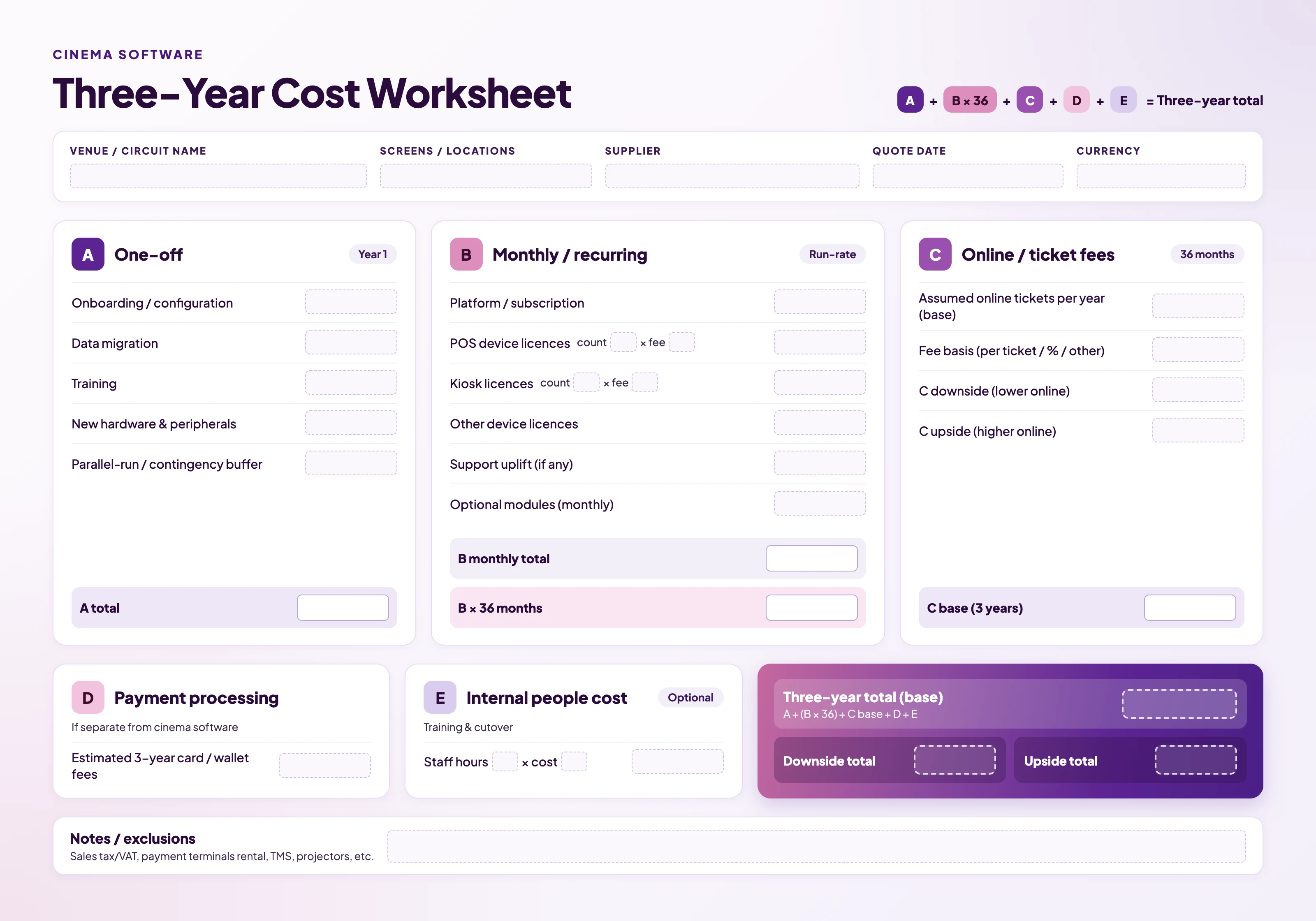
3-year total ≈ ( Year 1 one-offs: onboarding + migration + new hardware + training buffer )
- ( 12 × monthly run-rate × 3 )
- ( expected online fee over 36 months )
- ( planned module/hardware add-ons ) − ( any credited legacy contract overlap you can document )
Run base / downside / upside online-volume scenarios so finance is not surprised by a hit title.
Cinema software: three-year cost worksheet
Questions for a clean comparison
- What is included in the base subscription?
- Exact device licence list and what happens if we add a till mid-contract?
- Online fee schedule, including refunds and multi-ticket orders?
- Migration scope: advance bookings, gift cards, memberships, seat maps, customer records?
- Hardware reuse; what must be tested before you commit?
- Support hours that match your last screening, not only office hours?
- Exit: data export format and contract notice period?
Where cost advice changes by venue type
- Single-screen indie: Prioritise low fixed cost, simple device count, and migration help. A heavy online fee may still be fine if most sales stay at the counter.
- Three-screen / small circuit: Device licences and multi-user permissions matter more; central reporting should not require a fourth spreadsheet tool.
- Multi-site: Ask how pricing scales with locations, whether head-office users are charged, and how promotions/prices are controlled centrally vs locally.
Next step
Build the worksheet and then ask each shortlisted supplier to fill in the same lines.

